
Portfolio migration readiness
Stop re‑fixing the same migration data.
TidyData processes the mess. You review the exceptions.
For property migration and implementation consultants. TidyData prepares messy legacy property-management exports for migration, surfaces only the cases that need human judgment, and turns approved, repeatable decisions into rules for future batches.
Internal synthetic benchmark — not customer results.
What TidyData handles
The property-management data your migration depends on.
Seven entity types are in scope today, reconciled against each other in one supervised workflow.
- Properties
- Units
- Residents
- Leases
- Lease–resident relationships
- Recurring charges
- Balance snapshots
The problem
Migrations rarely stall on the new system. They stall on the old data.
Exports don't agree
Different files carry conflicting relationships, names, balances or identifiers for the same record.
The same corrections return every month
Test loads, deltas and follow-up exports bring back source-data problems the team already solved.
Decisions disappear into spreadsheets
Review knowledge lives in workbook tabs and people's memory, so it's hard to preserve or reuse.
Manual review doesn't scale
Experts spend hours inspecting rows that never needed their judgment.
How it works
Process. Review. Reuse.
The machine does the reconciling. People make the judgment calls. Every approved decision can make the next batch lighter.
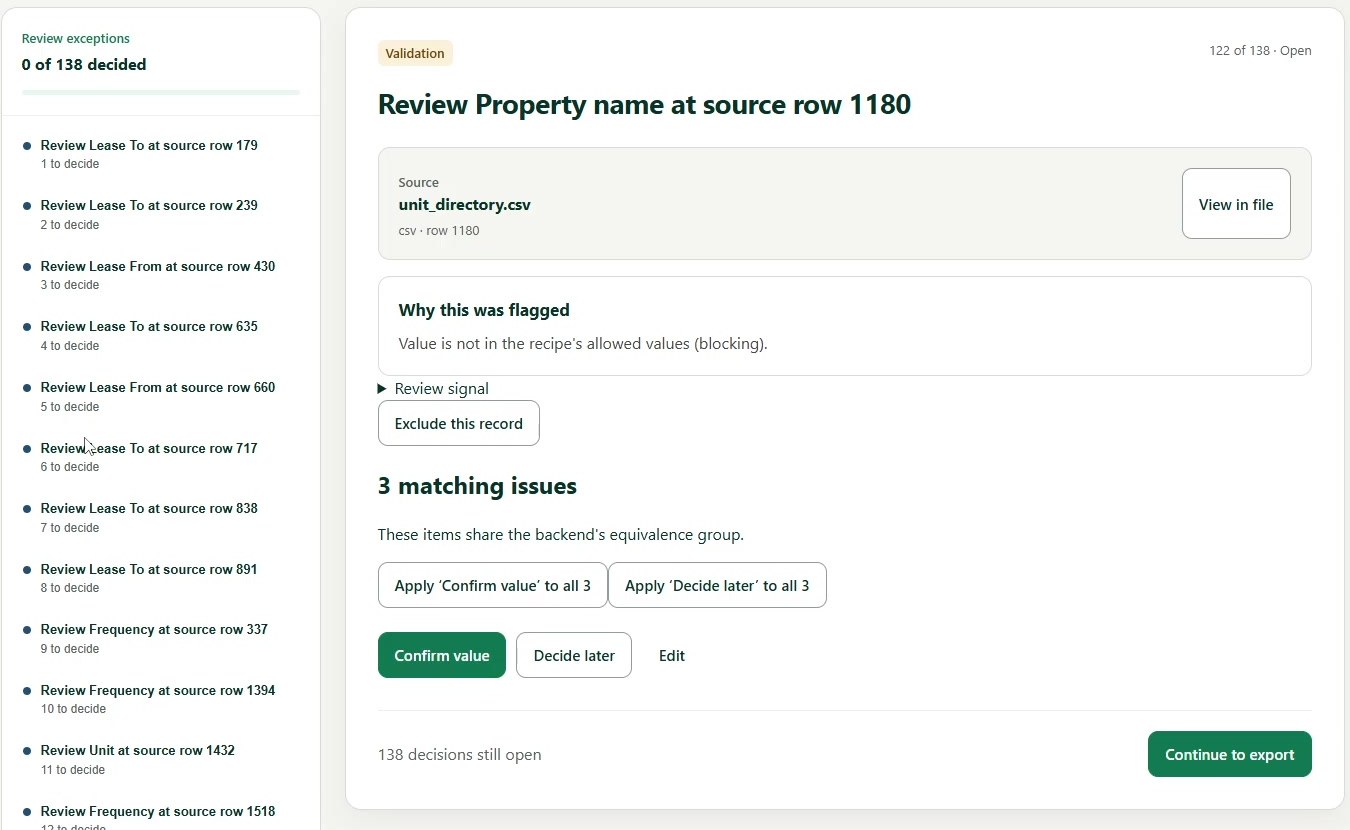
Reconcile six legacy exports in one pass.
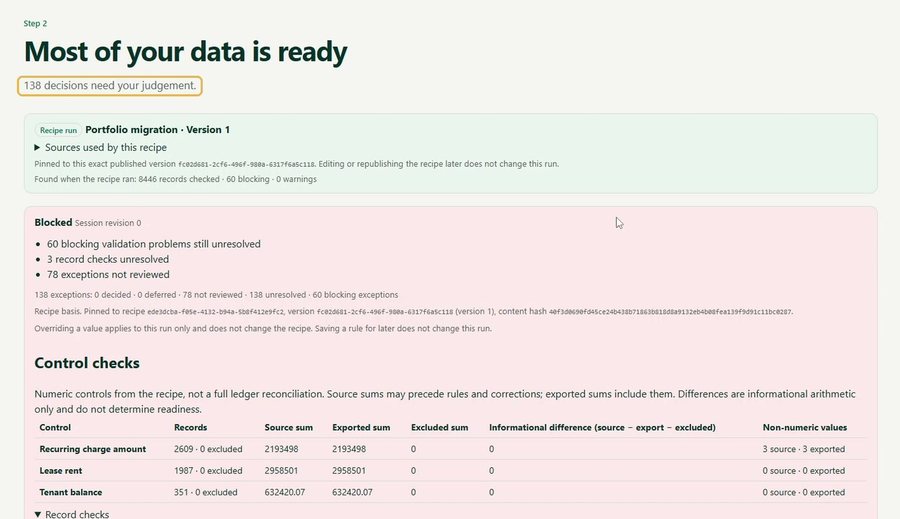
TidyData reconciles and analyzes the files against each other and against a published migration recipe, then reports readiness with control checks.
- Duplicates stay visible and are excluded automatically
- Each batch runs on a pinned recipe version
- Control checks compare source and exported sums
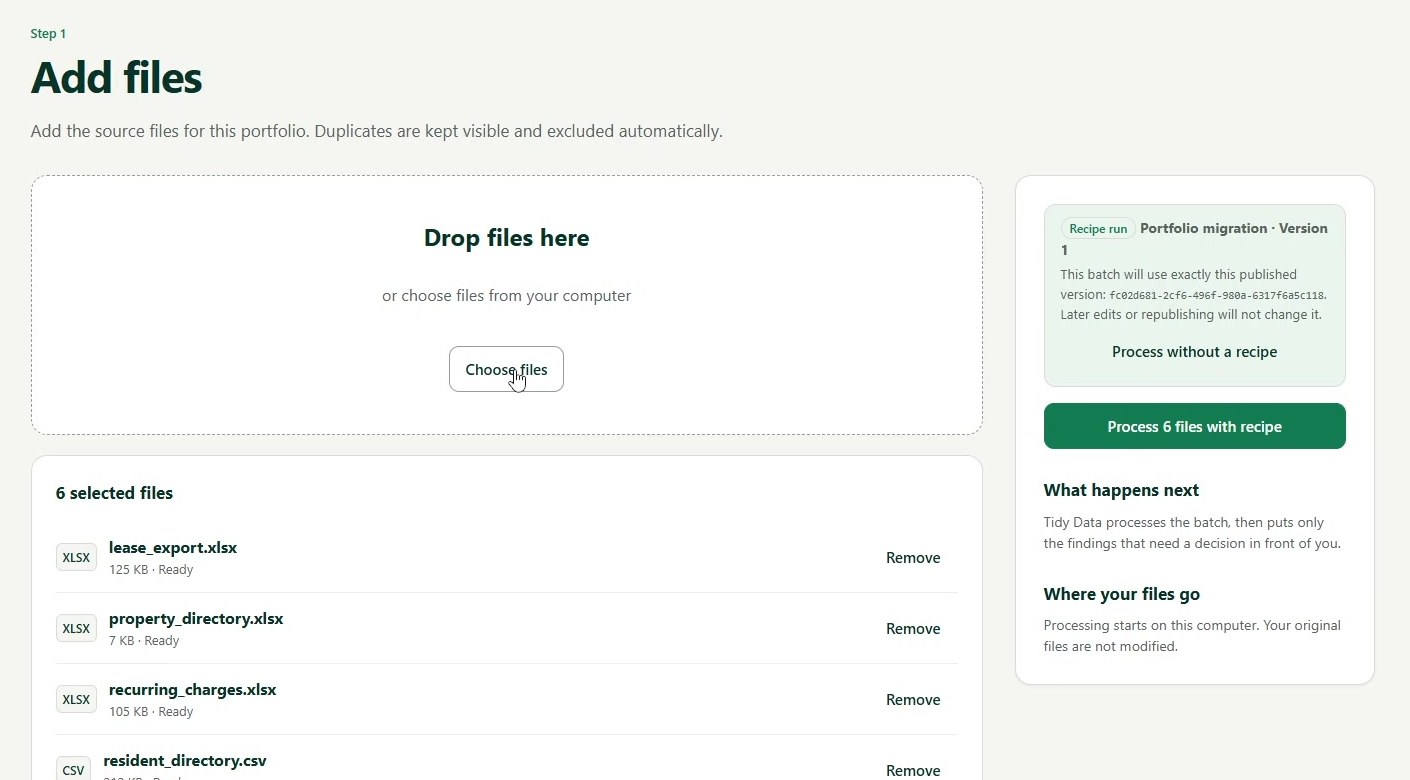
Only the judgment calls reach a person.
Exceptions arrive with their source evidence and provenance. The reviewer confirms, edits, excludes or defers, and every decision is recorded.
- Source file, row and the reason it was flagged
- Matching issues resolved with one decision
- Decisions are reversible, with Undo
- Interrupted sessions can be resumed
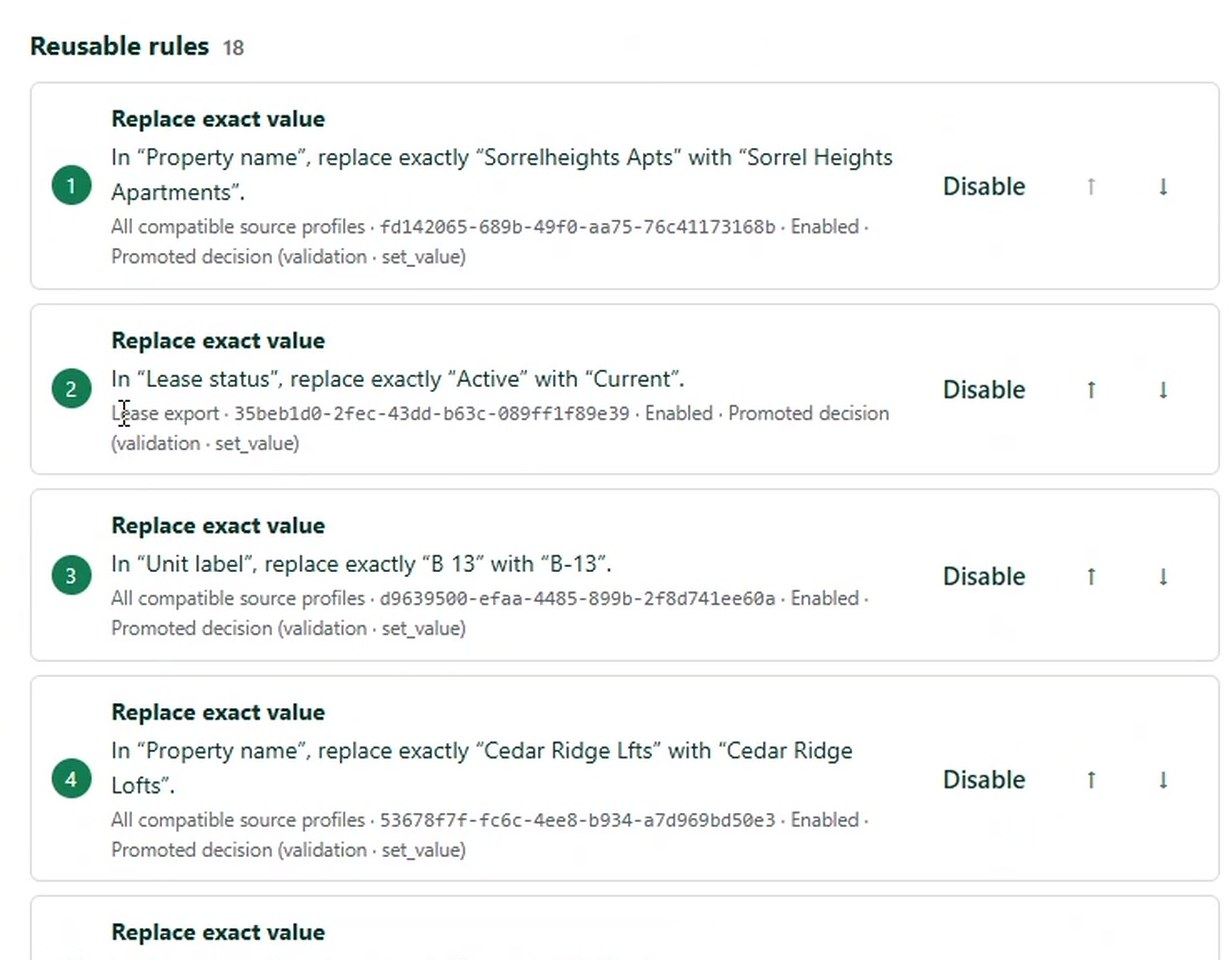
Approved fixes become versioned migration rules.
When a correction is a repeatable pattern, the reviewer promotes it into the recipe. Later batches apply it automatically, and the rest still waits for a person.
- Scope chosen per rule: one source or all compatible sources
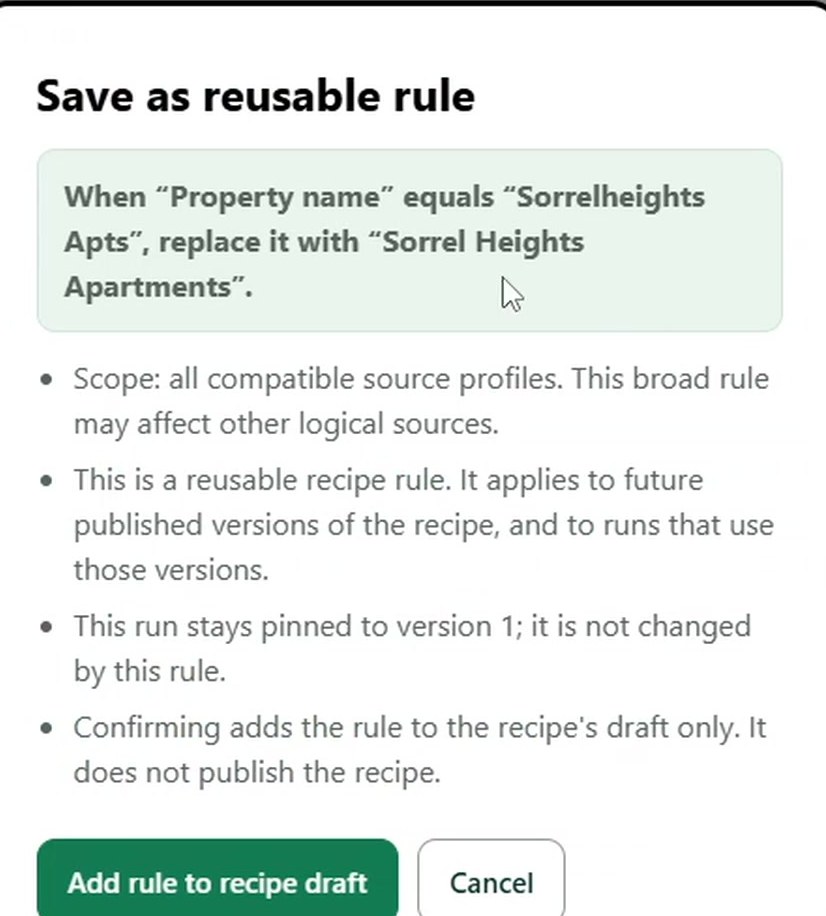
- Rules go to a recipe draft until a new version is published
- Past runs stay pinned and are never rewritten
- Each rule can be reordered or disabled
One exception, start to finish
From “Sorrelheights Apts” to a rule the next batch can reuse.
A real exception from the benchmark portfolio, followed through every step the product shows.
- 01The source value
The same property arrives in an inconsistent form.
Fileunit_directory.csvRow1180FieldProperty nameSorrelheights Apts - 02TidyData flags the exception
Value is not in the recipe's allowed values (blocking). Three matching issues are grouped with it.
- 03The reviewer sees the evidence
Source file, row and the reason for the flag, with View in file to open the original record.
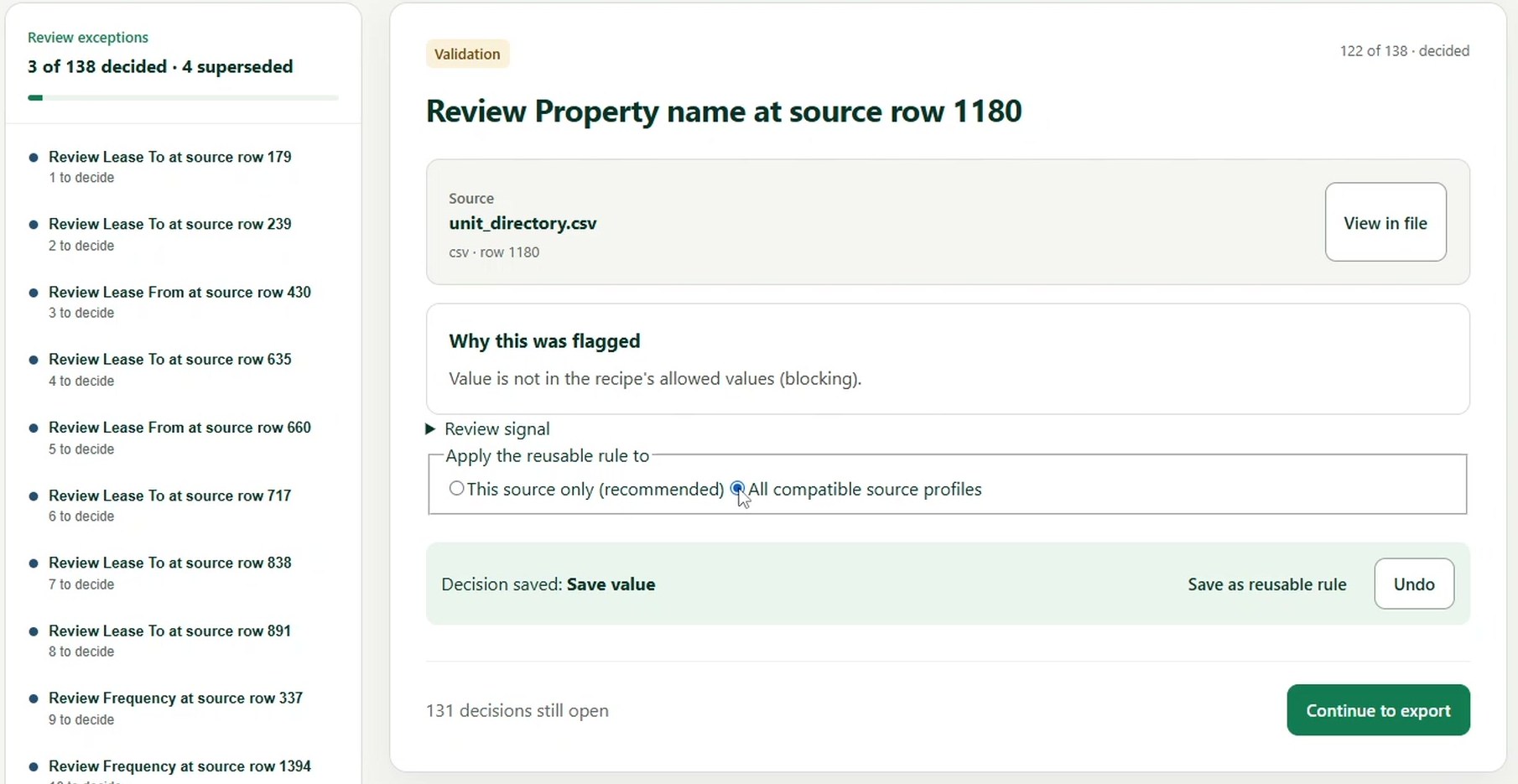
- 04The reviewer approves a correction
The decision is saved, recorded and can be undone.
Sorrel Heights Apartments - 05It becomes a reusable rule
When “Property name” equals “Sorrelheights Apts”, replace it with “Sorrel Heights Apartments”.
- 06Later batches reuse it automatically
Once the recipe version is published, the next export applies the rule without another review.
Product demo · 1:21
See a full migration-preparation cycle in 81 seconds.
Real TidyData product footage using the internal synthetic 1,500-unit benchmark. Captioned, no sound needed.
- 0:00Legacy exports
- 0:06Processing
- 0:12Exceptions
- 0:17Evidence
- 0:24Decision
- 0:31Reusable rule
- 0:48Next batch
- 1:07Final export
Benchmark · Batch 1 vs Batch 2
Approved decisions from Batch 1 reduced repetitive review on Batch 2.
Internal synthetic 1,500-unit benchmark — not customer results.
What it shows: the 18 rules reviewers approved on Batch 1 were applied 50 times on Batch 2, so fewer repeat issues reached the queue. Human review time was not measured, so we don't present this as time saved.
Stress-tested at 5,000 units / 100 properties. The fully accepted end-to-end UI/recovery/export benchmark currently remains 1,500 units.
Security & human control
Built for supervised migration work.
Your client's data, your reviewers' judgment, and a record you can defend at handover.
Local-first processing
The canonical v0.8 structured migration benchmark ran locally with zero external network calls and zero AI/API cost. Original source files are not modified. If an engagement requires external AI-assisted processing, that will be disclosed before production data is processed.
Evidence before decisions
Every exception is connected to its source file, row and provenance, so reviewers decide with the original record in view.
Human-controlled
Uncertain issues can stay unresolved or deferred instead of being silently guessed. Automatic changes only come from approved rules.
Auditable
Decisions, recipe versions and finalized outputs stay traceable. The export carries the decision log, reconciliation and a manifest.
The commercial offer
Portfolio Migration Readiness Pilot
A scoped, paid engagement on one real legacy portfolio. You see what your data needs before migration, and what the second batch looks like with approved rules.
1You provide
Representative CSV/XLSX legacy exports for one portfolio.
2TidyData does
Processes the files, reconciles relationships, surfaces exceptions, records decisions and builds reusable rules.
3You receive
- Finalized structured export
- Review and decision log
- Reconciliation and readiness summary
- Reusable migration recipe, where applicable
4Your team controls
Human reviewers make the migration judgments and sign off the final outputs.
- Fixed fee based on portfolio scope
- NDA welcome
- A representative sample can be scoped before full client data is shared
Built by TidyData Studio · Youssef, Founder · hello@tidydatastudio.com
TidyData is currently working with a small commercial-pilot model while the migration workflow is validated with real practitioners.
Scope, stated plainly
What TidyData is not.
Knowing the boundaries is part of trusting the product.
TidyData prepares and reviews migration data. Human reviewers remain in control of migration judgments.
Yardi, AppFolio and Buildium are examples of potential destinations, not current native integrations.
Current pilot scope does not claim complete GL, payment-history, owner-accounting or ledger migration.
TidyData prepares and validates data; it does not currently perform the complete destination-system implementation.
FAQ
Questions consultants ask first.
How is data handled?
The canonical v0.8 structured migration benchmark ran locally with zero external network calls and zero AI/API cost. Original source files are not modified. If an engagement requires external AI-assisted processing, that will be disclosed before production data is processed. NDA welcome.
What kind of files does it work with?
Structured legacy exports in CSV and Excel (XLSX) format, covering properties, units, residents, leases, lease–resident relationships, recurring charges and balance snapshots.
Can the output go into Yardi, AppFolio or Buildium?
They're possible destinations, but TidyData has no native integrations with them. It produces a finalized structured export and decision record for the next migration step.
Do rules change work that's already complete?
No. A run stays pinned to the recipe version it started with. New rules go into a recipe draft and only apply to later runs once a new version is published.
Why does the demo show 87 review items but 76 review actions?
Review items and review actions measure different things. Review items are entries surfaced in the review queue, while review actions count the decisions or deferrals a reviewer actually had to make. In Batch 2, the benchmark contained 87 review items and required 76 review actions.
Are the benchmark numbers from customers?
No. They come from an internal, fully synthetic benchmark portfolio of 1,500 units across 30 properties. TidyData does not yet have customer results to publish.
Is TidyData a subscription?
Not currently. Work starts with a fixed-fee Portfolio Migration Readiness Pilot, scoped to one portfolio.
Migration-readiness pilot
Bring one portfolio. See what the second batch looks like.
TidyData processes the mess. You review the exceptions.